
Use iQall to reduce the cost and increase the productivity of your calls – No Longer Available for Purchase
Please Note: The Epygi iQall Advanced Features is no longer available for purchase. Epygi will continue to support the end-of-life products for a four (4) year period from the EOL last ship announcement date. For more details, please refer to Epygi Technologies Product Life Cycle Overview document, on Epygi’s support portal.
With its full range of features, eQall will be a great replacement for Epygi iQall Advanced Features. Epygi’s eQall had grown to become a full desk phone replacement for those needing to work from home. If you are interested, check out our eQall.
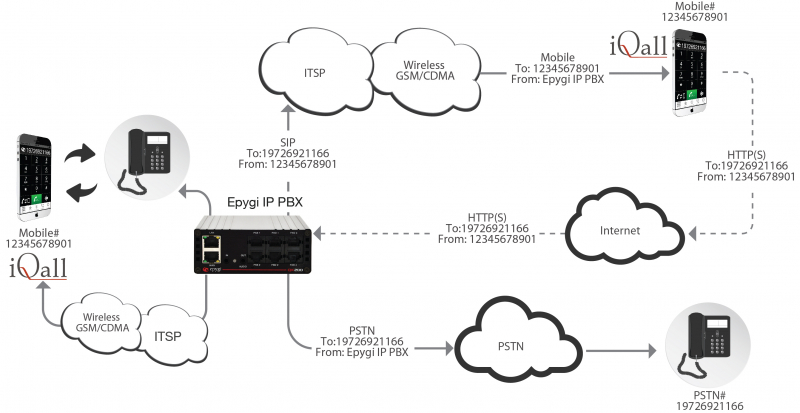
iQall allows you to make free calls from your iPhone or Android device (hereafter smartphone); increasing productivity while reducing cost. By dialing the number you want to call from your smartphone, iQall will send via the Internet a request to your QX or Quadro IP PBX to connect your smartphone with the dialed number.
If you have a GSM plan with free incoming calls, you don’t have to pay any charges on your smartphone.
You can also toggle the active call between your desk phone and smartphone. The Mobile Toggling is a licensable feature that enables users to alternate the call from their smartphone running iQall to their desk phone without the call being dropped.
For example, if you have an important conversation on your desktop phone but have to leave the office, you can easily switch the call from your desktop phone to smartphone and leave the office without interrupting the call. Similarly, if you place the call with iQall but upon coming to the office want to continue the conversation on your desktop phone, you can easily make the change by just pressing the toggle button.
Requirements
- The Epygi IP PBX is connected to the network and all network settings are properly configured.
- iOS6 or later for iPhone.
Android 3.0 or later for Android smartphones. - The Epygi IP PBX firmware version 5.3.61 or later.
How it works
iQall uses the Epygi IP PBX to establish the calls between your smartphone and the dialed numbers anywhere in the world. After installing iQall on the smartphone and configuring it with Epygi’s IP PBX, dial or select the number you want to call and press the “Call” button. iQall will send via the internet a request to the Epygi IP PBX to connect your smartphone to the dialed number. The Epygi IP PBX will call you back via the mobile carrier and then connect you to the dialed number.
It doesn’t matter where you are, you can call to coworkers in the office by just dialing their extension number – the same as if you were in the office and calling from your desk phone.
Your smartphone number and the number you are calling should comply with the dialing plan for the Epygi IP PBX. The dialed digits would be similar to those dialed from your desk phone.
If you installed the Mobile Toggling license on the Epygi IP PBX, you can seamlessly toggle the active call between your desk phone and the smartphone without dropping the call, unannounced to the other person on the call.
Since the Epygi IP PBX will place an initial call to your smartphone before connecting to the called number, the call to your smartphone will be free if you have a mobile service plan with free inbound calls. Also, since the connection to the called number is established by the Epygi IP PBX, you don’t need to pay for that connection on your smartphone, even for international calls.
If your smartphone is not tied with a specific carrier, you will save even more on roaming charges when traveling. Just install a SIM card from the local carrier and make calls using iQall. The Epygi IP PBX from your office will call you back via the ITSP (Internet Telephony Service Provider) or any other carrier configured in your Epygi IP PBX, and will connect the call. Your SIM card will not be charged at all.
The Epygi IP PBX can be configured with multiple carriers (cellular, local, long distance or VoIP) for placing external calls and the cheapest carrier will be used for connecting the calls.
Configuring iQall
To configure iQall follow the steps below:
- Open the iQall application and tap on the Settings icon on the bottom and start configuring application as follows:
- Address – the IP address of the Epygi IP PBX used by iQall for making calls.
- Port – enter http (80) or https (443) port of the Epygi IP PBX used by iQall.
- Secure Connection – select OFF for HTTP and ON for HTTPS connection.
- User Name – your extension number on Epygi IP PBX that should be attached to iQall. All calls initiated by iQall will be made on behalf of that extension.
- Password – your extension’s password.
Attention: Make sure that the 3PCC/Click2Dial Access Allowed option is enabled from the Extensions Management ->Edit Extension->General Settings GUI page on Epygi IP PBX. - Call Fail Timeout – 60.
- Call Back – enter your smartphone’s cellular number routable from the Epygi IP PBX.
- RULES – configure the dialed number modification rules if needed. There is a maximum of three modification rules allowed. Modification rule consists of the three parts: “Pattern”, “Discard” and “Prefix”. The “Pattern” may include the “*” and “?”wildcard characters and plays the same role as the “Destination Number Pattern” field in the Call Routing Table on the Epygi IP PBX. “Discard” specifies the number of digits that will be discarded from the beginning of the dialed number if it matches with the pattern. “Prefix” will be placed in front of the number.
- Tap on Done to save the settings.
Configuring the Epygi IP PBX
To make a call iQall sends from the smartphone to the Quadro IP PBX the HTTP(s) request with the smartphone’s and the dialed (destination) numbers in it. Upon receiving that request, the Epygi IP PBX calls you back on your smartphone and as soon as the call is answered, it makes the call to destination number and connects both call legs in one call. Once established, the call between the smartphone user and the dialed number passes through the Epygi IP PBX (both call signalling and the voice streams). Therefore, in order for the Epygi IP PBX to make both calls in the Call Routing Table on the Epygi IP PBX, you need to have the appropriate Call Routing rule that routes the calls to your smartphone and the destination number.
Below are some prerequisites related to the Call Routing rule used by iQall for making calls:
- The iQall initiates calls on behalf of the extension attached to iQall, and therefore, if the “Filter on Source / Modify Caller ID” is enabled on Call Routing Wizard, the “Source Number Pattern” should be configured appropriately.
- If the “Destination Type” of the call routing rule is “SIP”, “SIP-Tunnel” or “IP-PSTN” then the “Use RTP Proxy” needs to be enabled.
- If both call legs (calls to smartphone and to the dialed number) are using the same Call Routing rule then the ITSP/SIP account connected to that rule shall allow the user to make two simultaneous calls via that account.
Attention: iQall is using the management access port for sending the call request to the Epygi IP PBX. This is port 80 for HTTP and port 443 for HTTPS. Therefore, the Management Access rules will need to be enabled in the IP PBX Firewall/Filtering Rules.
Making Calls
To make a call follow the steps below:
- Tap on the iQall icon to launch the application.
- Enter the phone number from keypad or select it from “Contacts”, “Favorites” or “Recents”.
- Press the “Call” button to make a call.
- The “Calling…” message with the contact’s name and phone number will pop-up and the Epygi IP PBX will call you back in a few seconds via your cellular carrier.
- Upon receiving the call from cellular carrier, tap the Answer button and wait until IP PBX connects you to the dialed number.
Mobile Toggling
The Mobile Toggling is a licensable feature that enables users to alternate the call from their smartphone running iQall to their desk phone without the call being dropped.
To switch the active call from your desk phone to smartphone, just open iQall and push the toggle button. The Epygi IP PBX will call you on the smartphone and upon answering will switch that call from your desk phone to smartphone unnoticeably to the other person on the call. You can also switch the active call initiated by iQall from your smartphone to the desktop phone. During the call, press the smartphone’s “Home” button to close the smartphone native phone application window and open iQall. Push the toggle button. The Epygi IP PBX will call you on your desktop phone and upon answering will switch that call from your smartphone to your desktop phone unnoticeably to the other person on the call.
Activated Mobile Toggling licenses should be allocated to the corresponding extensions. The following steps describe how to allocate a license to an extension:
- Select Extensions Management from the Users menu.
- Select the extension to which the Mobile Toggling is to be used and click Edit.
- On the Extensions Management – Edit Entry page for the selected extension, click the Licensing tab and select the Enable iQall Toggling license checkbox.
- Click Save to submit the changes.