

uQall Softphone – Stay Connected Wherever You Work
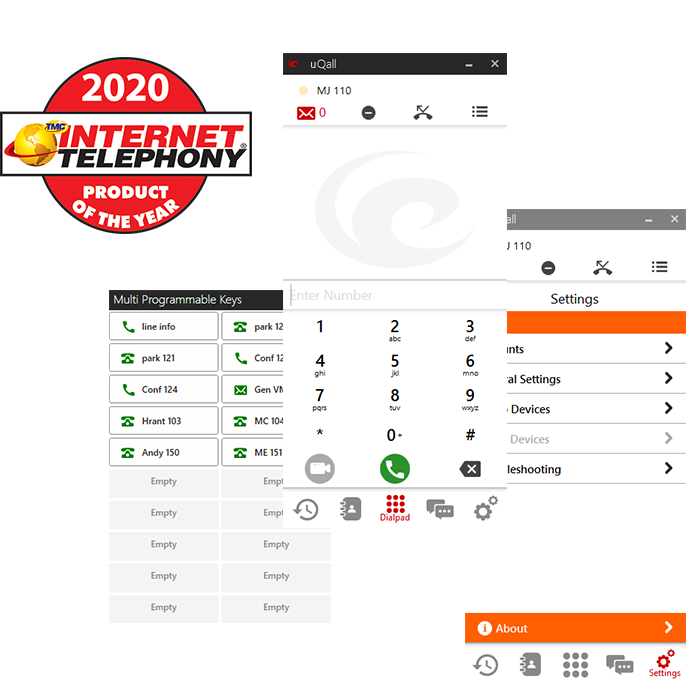
uQall is Epygi’s business softphone for Windows, Android, and iOS, giving users access to their Epygi business extension from a computer, laptop, or smartphone. Make and receive business calls, access PBX features, and stay connected whether working in the office or remotely.
Designed as a flexible alternative to a physical desk phone, uQall integrates directly with Epygi QX/UC IP PBXs and ecQX Cloud PBX. Once activated, it registers as a standard PBX extension, giving users familiar business communication capabilities without requiring a physical SIP phone.
More than a traditional softphone, uQall brings calling, presence, messaging, contacts, programmable keys, and other communication tools into one convenient application. Its intuitive interface and automatic provisioning make deployment and everyday use simple for both users and administrators.
Formerly known as eQall, uQall represents the continued evolution of Epygi’s softphone into a more unified business communications experience.
Easy Setup & Connectivity
- Automatic Provisioning: Quickly configure uQall by scanning the QR code generated on the Epygi system.
- Flexible Network Connectivity: Supports IP address detection, NAT traversal, and SIP proxy connectivity.
- Multiple SIP Accounts: Register up to 8 SIP accounts on the same or different Epygi systems.
- Automatic Software Updates: Keeps uQall up to date with the latest available software.
Calling & Communications
- Voice & Video Calling: Make and receive business voice and video calls with support for multiple audio and video codecs.
- Call Management: Hold, switch, transfer, park, forward, and manage calls directly from uQall.
- Presence & Call Information: View presence status, call history, call-quality indicators, voicemail notifications, and call notifications.
- Collaboration: Use 3-way conferencing and embedded chat, SMS/WhatsApp messaging.
- Secure Communications: Supports TLS and SRTP.
Programmable Keys
Configure up to 20 programmable keys for quick access to frequently used functions, including:
Extension Status • Callback • Call Block • Line Info • Speed Dial • Call Park • ACD Agent Login/Logout • Shared Voicemail • Day/Night Schedule
Receptionist Console
- Extension Monitoring: View the status of up to 100 watched extensions, including ringing and active calls.
- Call Handling: Quickly call watched extensions, transfer or intercept calls, and leave voicemail directly from the Receptionist Console.
Contacts & Messaging
- Multiple Contact Sources: Access Microsoft Outlook contacts, uQall contacts, QX phone book contacts, and Favorites from one place.
- Integrated Messaging: Access messaging capabilities, including in-call messaging.